NCVT ITI Certificate Download PDF 2025 If you want to download the NCVT ITI Certificate PDF 2025 online, this article will walk you through the complete process. Here, you will find clear step-by-step instructions to help you get your NCVT ITI Certificate quickly and easily. For the most accurate and verified updates regarding results, marksheets, certificates, and admit cards, always search on Google by typing “Ncvt ITI Result.Org”.
In this guide, we have explained two simple ways to download your NCVT MIS Certificate PDF, along with direct access links for each step. By following the given process carefully, you can download your certificate at home without facing any trouble.
NCVT ITI Certificate Download PDF 2025 – Overview
| Section | Information |
|---|---|
| Title of Article | NCVT ITI Certificate PDF Download 2025 |
| Official Portal | NCVT MIS (Management Information System) |
| Supervising Authority | National Council for Vocational Training – NCVT |
| Certificate Type | ITI Result / Marksheet / Passing Certificate |
| Mode of Availability | Online Download (PDF Format) |
| Implemented By | Ministry of Skill Development and Entrepreneurship (MSDE) |
| Eligible Candidates | Students enrolled in Government or Private ITIs |
| Objective | To provide an official digital copy of ITI training and result records |
| Official Website Link | https://ncvtmis.gov.in |
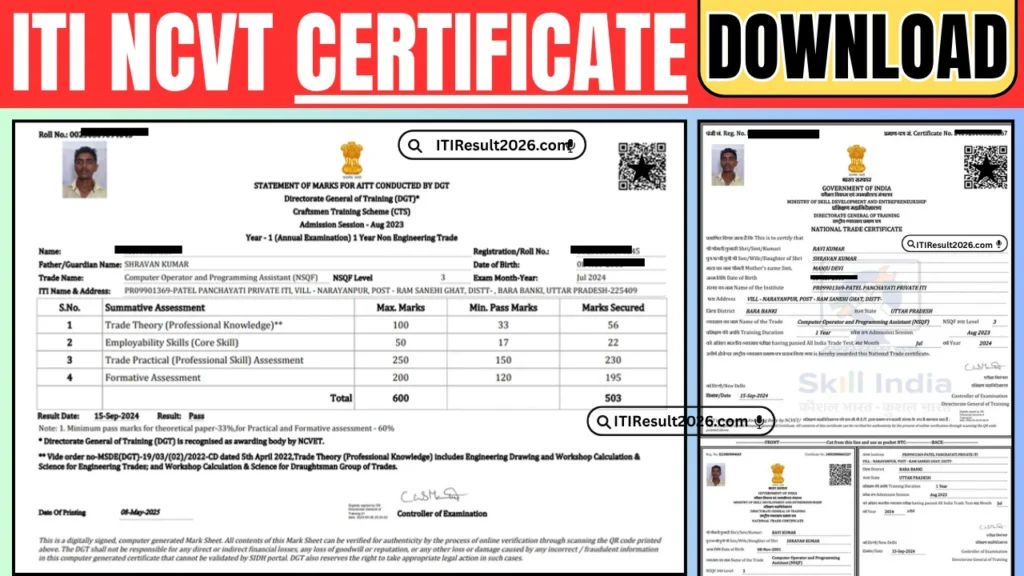
NCVT ITI Certificate Download 2025 – Step-by-Step Process
Students who want to download their NCVT ITI Certificate PDF 2025 can easily do so by following the instructions given below. This section explains two simple methods with clear, stepwise guidance and direct links for quick access.
To start the process, search for “Skill India” on Google and open the official website – skillindiadigital.gov.in. After that, log in using your PNR Number and Date of Birth. Once logged in, you’ll find multiple options such as View Result, Download Marksheet, and Download Certificate. Simply click on the Download Certificate option to save your ITI certificate in PDF format. If you prefer an alternate method, another procedure has also been described later in this article.
Step-by-Step Guide to Download NCVT ITI Certificate
- Step 1: Open Google and type “Skill India” in the search bar.
- Step 2: Click on the official website link – skillindiadigital.gov.in.
- Step 3: On the homepage, select the Login option.
- Step 4: A login window will appear. Enter your PNR Number and Date of Birth, then click on Login.
- Step 5: Once you are logged in, navigate to the Result section.
- Step 6: On your trainee dashboard, click the three-dot menu (⋮) visible on the screen.
- Step 7: You’ll now see three options —
- View Result
- Download Marksheet
- Download Certificate
- Step 8: Choose the Download Certificate option.
- Step 9: Your ITI certificate details will appear on the screen.
- Step 10: Scroll down and again click on the three-dot menu (⋮) at the bottom.
- Step 11: Select Download Certificate, and your NCVT ITI Certificate will be automatically downloaded in PDF format.
By following these steps carefully, students can easily access and save their official NCVT ITI Certificate at home within minutes—without any difficulty or technical help.
NCVT ITI Certificate Download PDF 2025 — Method 2 (Official NCVT Website)
To download your ITI Certificate PDF using the second method, use the NCVT MIS portal. Visit the official site and access your trainee profile by entering the required credentials. After submitting the details, your trainee information and certificate section will appear — scroll down and choose the print/download certificate option to save the PDF to your device.
Read More
Step-by-step instructions
- Open Google and search for NCVT.
- Click the official website: ncvtmis.gov.in.
- On the homepage, navigate to Trainee → Trainee Profile.
- On the form page, provide the following:
- Registration Number
- Father/Guardian Name
- Date of Birth
- Captcha Code
- Press Submit.
- Your trainee profile and certificate information will be displayed.
- Scroll down and click Print Certificate.
- The ITI Certificate will be downloaded as a PDF — save it for future use.
Conclusion – NCVT ITI Certificate Download PDF 2025
Downloading the NCVT ITI Certificate 2025 is now a completely online and convenient process. Students can easily access their official ITI Certificate, Marksheet, or Result PDF either through the Skill India Digital Portal or directly from the NCVT MIS official website.
Both methods are simple and secure — just log in with your registration details, verify your profile, and download the certificate in PDF format within minutes. Make sure to check all details carefully before saving or printing the document.
This digital certificate is valid across all government and private sectors, serving as authentic proof of your ITI training and successful completion. Always keep a soft copy and printed copy of your certificate safe for future job applications or verification purposes.
FAQs – NCVT ITI Certificate Download PDF 2025
Q1. What is the NCVT ITI Certificate?
The NCVT ITI Certificate is an official document issued by the National Council for Vocational Training (NCVT) under the Ministry of Skill Development and Entrepreneurship (MSDE). It certifies that a student has successfully completed their ITI training and passed the trade exam.
Q2. How can I download my NCVT ITI Certificate 2025?
You can download your certificate using two official methods:
Through the NCVT MIS Portal – ncvtmis.gov.in
Through the Skill India Digital Portal – skillindiadigital.gov.in
Q3. What details do I need to download the certificate?
You will need the following information:
Captcha Code
Permanent Registration Number (PRN) or Registration Number
Father’s/Guardian’s Name
Date of Birth
Q4. In what format is the ITI Certificate available?
The NCVT ITI Certificate is available in PDF format, which can be easily saved, shared, or printed for future use.
Q5. Is the online NCVT ITI Certificate valid for government jobs?
Yes. The digitally downloaded certificate from the NCVT MIS portal is fully valid and recognized for all government and private sector applications.
Q6. What should I do if I cannot download my ITI Certificate?
If you face issues while downloading, try these steps:
Contact your ITI training institute or NCVT support team for help.
Check if the certificate has been released for your session.
Re-enter your login details correctly.
Clear your browser cache or use another browser.
Q7. Can I download the NCVT ITI Certificate on my mobile phone?
Yes. You can easily access and download your certificate on any smartphone using a browser. Make sure to save the file and transfer it to your system if you need to print it.
Q8. Do I need to pay any fee to download the NCVT ITI Certificate?
No. Downloading the NCVT ITI Certificate is completely free of cost on the official portals.
Q9. Can I use the certificate for higher studies or apprenticeship registration?
Yes. The NCVT ITI Certificate is valid for apprenticeships, higher technical education, and recruitment exams related to your trade.
Q10. What if there’s an error or missing detail in my ITI Certificate?
If you find any discrepancy in your details, immediately contact your ITI institute or raise a query through the official NCVT portal for correction.
Q11. Should I keep a printed copy of my certificate?
Yes. Although the certificate is available digitally, it’s recommended to print and laminate a copy for documentation and future verification purposes.
